Powered by Celcom Axiata, our redONE users get to enjoy the same widest and best network coverage throughout Malaysia.
Locate An Agent
Visit one of our appointed agents or partners in your region.
FAQ
What is the new redSOCIAL monthly recurring Value-Added Service (VAS)? The new redSOCIAL is an auto-recurring VAS that offers 10GB 4G LTE data access to stream Facebook,
Instagram,
WhatsApp & WeChat at only RM10 per subscription.
Is redSOCIAL a permanent VAS offered by redONE? Yes, it is available for subscription starting from 2 October 2019.
Where can I subscribe to redSOCIAL monthly recurring VAS? For new customers, you can subscribe to the redSOCIAL monthly recurring VAS when you sign up for a
new
redONE line or port-in a number to redONE at any redONE Branch and redONE Partners near you. For
existing
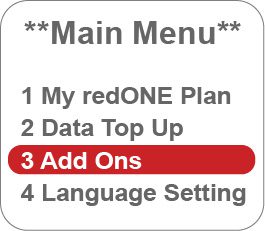
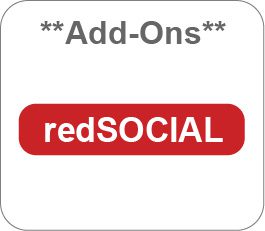
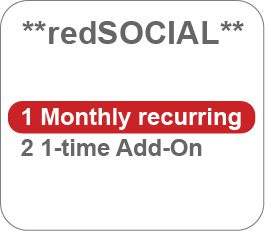
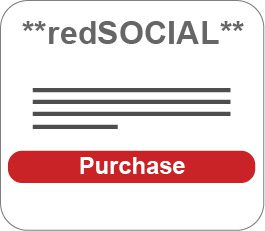
customers, you can subscribe to the redSOCIAL monthly recurring VAS via two (2) ways:
Dialing *108# or
Prepaid App
Who can subscribe to the redSOCIAL monthly recurring VAS? redSOCIAL monthly recurring VAS is available to all redONE Prepaid plans customers.
I have purchased the 1-time Add-on on 21 September 2019. I would like to subscribe to the redSOCIAL
monthly
recurring VAS? A subscription to the redSOCIAL recurring VAS while the 1-time Add-on redSOCIAL is active will
result in the
active 1-time Add-on redSOCIAL balance data quota being FORFEITED. You are advised to only subscribe
once
your previous redSOCIAL 1-time Add-on quota is used up or expired.
How do I unsubscribe from redSOCIAL monthly recurring VAS? You can contact our Customer Care to unsubscribe your redSOCIAL monthly recurring VAS.
I have terminated my subscription to redSOCIAL monthly recurring VAS. Can I subscribe to redSOCIAL
monthly
recurring VAS again? Yes, you can resubscribe via USSD *108# or via Prepaid App. RM10 per month will be charged to your
bill for
every successful subscription to redSOCIAL monthly recurring VAS.
Is there any registration fee required if I subscribe to redSOCIAL monthly recurring VAS? No, there is no registration fee required.
Will I be tied to a contract if I subscribe to redSOCIAL monthly recurring VAS? No, there is no contract for redSOCIAL monthly recurring VAS. You can choose to terminate the
redSOCIAL
monthly recurring VAS at any time you want. However, the subscription fee will not be pro-rated and
a
full
month subscription fee will be charged to your bill.
How do customers check their redSOCIAL monthly recurring data usage? Customers can check the usage via dialing *108# or Prepaid App.
I have fully utilized the redSOCIAL monthly recurring 10GB quota. Can I subscribe to redSOCIAL monthly
recurring
VAS again? No, only ONE (1) active subscription is allowed in a month. However, you can purchase the redSOCIAL
1-time
Add-on. For each successful purchase, RM10 will be charged to your bill.
When can I utilize the redSOCIAL monthly recurring VAS unlimited data quota? You can utilize the redSOCIAL monthly recurring VAS unlimited data quota at any time.
What is the speed of the unlimited data for redSOCIAL streaming? The speed of the 10GB data quota for redSOCIAL streaming is high-speed 4G LTE data. You will need to
use a 4G
LTE compatible device to enjoy the 4G speed.
How will my quota be used when I subscribe to redSOCIAL ? You will be given a separate 10GB data bucket, and thus your bundled plan quota will not be used when
you
access Facebook, Instagram, WhatsApp & WeChat at high speed.
What if I access a link in Facebook?
If the content is within Facebook, your redSOCIAL quota will be
used.If the content link is outside of Facebook:
With Internet quota balance: your Internet Plan quota will be used.
Without Internet quota balance: your usage will be reduced to a speed of 64kbps or will be charged
Pay-Per-Use
rate at RM0.10 / MB.
What if I access a link in Instagram?
If the content is within Instagram, your redSOCIAL quota will be
used.If the content link is outside of Instagram:
With Internet quota balance: your Internet Plan quota will be used.
Without Internet quota balance: your usage will be reduced to a speed of 64kbps or will be charged
Pay-Per-Use
rate at RM0.10 / MB.
What if I access a link in WhatsApp?
If the content is within WhatsApp, your redSOCIAL quota will be
used.If the content link is outside of WhatsApp:
With Internet quota balance: your Internet Plan quota will be used.
Without Internet quota balance: your usage will be reduced to a speed of 64kbps or will be charged
Pay-Per-Use
rate at RM0.10 / MB.
What if I access a link in WeChat?
If the content is within WeChat, your redSOCIAL quota will be used.If the content link is outside of WeChat:
With Internet quota balance: your Internet Plan quota will be used.
Without Internet quota balance: your usage will be reduced to a speed of 64kbps or will be charged
Pay-Per-Use
rate at RM0.10 / MB.
Terms & Conditions
The new redSOCIAL monthly recurring Value-Added Service (VAS) is valid from 2 October 2019.
The new redSOCIAL monthly recurring VAS is valid for all new and existing Prepaid plans customers.
Customers can subscribe the new redSOCIAL monthly recurring VAS during line registration, via USSD *108# or Prepaid App.
The new redSOCIAL monthly recurring VAS offers 10GB high speed all day streaming to four (4) popular social media channels (Facebook, Instagram, WhatsApp & WeChat) every day until the end of the month or until the data is fully utilised.
redSOCIAL monthly recurring VAS is a subscription based VAS and will be auto renewed on the 1st of every month unless redSOCIAL has been terminated.
The monthly fee for redSOCIAL monthly recurring VAS is not pro-rated. Customers will be charged a full RM10 in the bill upon successful subscription.
A subscription to the redSOCIAL recurring VAS while the 1-time Add On redSOCIAL is active, the active 1-time Add On redSOCIAL data quota balance will be FORFEITED. Customer is advised to only subscribe once your previous 1-time Add On redSOCIAL quota is used up.
If the customer adds the redSOCIAL monthly recurring VAS subscription at any time within the month, any previous usage will be charged normal rate and is not calculated under the 10GB redSOCIAL monthly recurring VAS data bucket. Only the usage after the successful subscription will be calculated under the 10GB redSOCIAL monthly recurring VAS data bucket.
Customers can subscribe the monthly recurring redSOCIAL VAS at any time. Once the customer have fully utilised the 10GB quota, they can purchase the 1-time Add On redSOCIAL VAS.
The redSOCIAL 10GB data quota will expire at the end of the calendar month. Any unutilised redSOCIAL data will not be carried forward to the following month.
The 10GB 4G LTE data can only be used for streaming 4 redSOCIAL social media channels. Other data usage will be deducted from the available bundled high speed data or charged Pay-Per-Use.
When streaming via Facebook, Instagram, WhatsApp & WeChat, the 10GB redSOCIAL data quota will be utilised first.
Upon 100% utilization of the redSOCIAL quota, any further Internet usage will be deducted from the bundled high speed data, available Data Top Up quota or charged Pay-Per-Use rate at RM0.10 / MB. Customers who subscribes the auto recurring redSOCIAL VAS is allowed to purchase the purchase 1-time Add-on redSOCIAL VAS.
redSOCIAL can only be utilized domestically i.e. within Malaysia network only. Streaming via Facebook, Instagram, WhatsApp & WeChat when overseas are subjected to data roaming charges. The customer shall be charged based on the data rates imposed by the respective redONE roaming operators for data usage while roaming with redONE’s overseas roaming partners.
Some redSOCIAL partners may only offer content via its mobile app and not through web browser and some content may be excluded by our redSOCIAL video partners.
To use redSOCIAL, you may be required to register for a personal account on our social media partners’ website or mobile app.
You can only subscribe to one (1) redSOCIAL monthly recurring VAS.
Customers with an active redSOCIAL monthly recurring VAS active can purchase the 1-time Add On redSOCIAL VAS. The quota will be combined.
Customers can request for termination at any time. The 10GB redSOCIAL high speed data quota will be forfeited upon successful termination. Customer is advised to terminate redSOCIAL before the start of the next bill cycle.
In the event the customer terminates redSOCIAL, the customer will be charged a full one (1) month subscription fee for the particular month even though the customer terminates redSOCIAL at any time of the month. Customers are advised to terminate redSOCIAL before the start of the next bill cycle.
redSOCIAL is non-transferable, whether by operation of law or otherwise, either to any other person, entity or any other redONE Postpaid account.
Any data used for internet or content access (such as advertisements and web analytic tools) other than for Facebook, Instagram, WhatsApp & WeChat streaming will be deducted from the customer’s plan data quota and not from the redSOCIAL data quota.
redONE will strive to fully utilise the redSOCIAL monthly recurring data quota whenever the customer is streaming via Facebook, Instagram, WhatsApp & WeChat via redSOCIAL. However, there may be instances where the redSOCIAL monthly recurring data quota may inadvertently be used even when there is no streaming content on social media partners happening or the data quota from the customer’s plan may be accidently used to stream instead of the subscribed redSOCIAL monthly recurring quota. These could occur due to a number of reasons including technical issues such as missed configuration or whitelisting of wrong IP address by third parties or due to the redSOCIAL partners changing or updating their IP addresses and URL without giving redONE sufficient notice to update our system. Customer must acknowledge the possibility of these instances happening and agree not to hold us liable.
Usage on our redSOCIAL partners’ website or mobile app is subjected to the respective social media partners’ terms and conditions, and privacy policies and are used or provided entirely at your own risk.
Key in your account number, phone number and amount.
Enter your 6 digit TNG eWallet pin.
Online Boost
Pay your bills with Boost.
Download and open the Boost App.
Select Bill Payments.
Add New Bill Account.
Select redONE.
Add redONE account number.
Save your info and make payment.
GrabPay
Pay your bills with GrabPay.
Download and open the Grab app.
Select Bills.
Select redONE Bill Payment.
Key in your redONE number and amount.
Select Enter.
redONE Partner Shop
Visit the nearest redONE Partner Shop to pay your bill in person
View the full listing of the redONE Partner Shops here to find an agent closest to you.
Celcom Payment Kiosks
You can now pay your bills at any Celcom Payment Kiosks.
As redONE’s services are powered by Celcom, our customers are also able to pay their redONE bills at all Celcom Payment Kiosks (CPKs). CPKs are strategically located in Celcom branches and Celcom Blue Cube outlets nationwide. View the full listing of CPK locations here.
7-Eleven
Visit the nearest 7-Eleven store to pay your redONE postpaid bill
For your convenience, you can now pay your redONE postpaid bill at any 7-Eleven outlet nationwide. Locate the nearest outlet here.
Mobile Money Merchants
Pay your redONE bill at over 1,500 shops nationwide that accept Mobile Money payments.
Through our partnership with Mobile Money, redONE users can now pay their bills at any Mobile Money retail merchants and terminals. Just look out for the Mobile Money symbol the next time you shop and ask to pay for “redONE” bill.
Maybank ATM, Cash Deposit Machine & Maybank2u
Pay your redONE bill with your Maybank banking account.
Visit any Maybank ATMs or Cash Deposit Machines nationwide, or login to your Maybank2u banking portal. Enter your redONE Customer ID which can be found on your monthly bill plus the payment amount, and you’re done!
NOTE: Please allow one (1) working day for any payment made via any Maybank channels e.g. ATM, Cash deposit and Maybank2u to be reflected in redONE Selfcare system.
Direct Debit
Charge your redONE bill directly to your credit card every month for your peace of mind.
For ultimate convenience and peace of mind, you can now set up monthly Direct Debit payments from your preferred credit card for your redONE bill. Our Customer Care representatives will be glad to help you set this up. Simply dial 1909 from your redONE number or 1300 11 0088 from other networks.
Senheng Stores
Visit the nearest Senheng stores to pay your bill in person
Through our partnership with Senheng, you are now able to pay your redONE bill at any Senheng outlets nationwide. Locate a Senheng store here.
senQ Stores
Visit the nearest senQ stores to pay your bill in person
Through our partnership with senQ, you are now able to pay your redONE bill at any senQ outlets nationwide. Locate a senQ store here.
e-Pay Retailers
Visit these retailers to top-up your prepaid in person.