Easily manage your account, pay bills, and earn rewards with the redONE 1App.

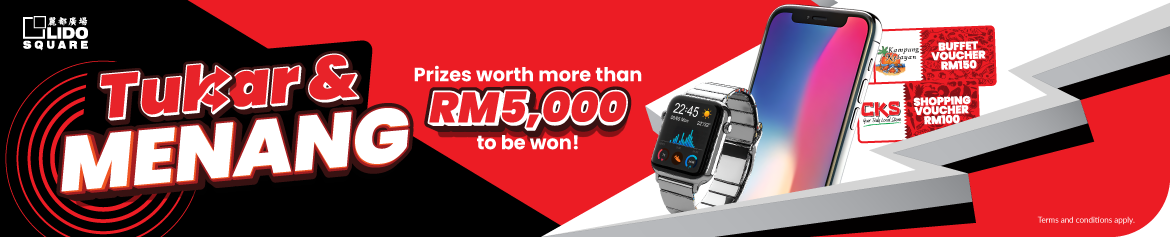
Exclusive promotion for you in Kota Kinabalu! Switch to redONE Postpaid at the Lido Square, Kota Kinabalu and stand a chance to win amazing prizes worth over RM5,000!

Switch now at the Lido Square, Kota Kinabalu!

Switch now at the Lido Square,
Kota Kinabalu!

*For a full list of countries and their respective call charges, please check here.
*All prices stated exclude Service Tax, applicable only for redONE Postpaid users.

Check Coverage

Powered by Celcom Axiata, our redONE users can enjoy the same widest and best network coverage throughout Malaysia.

Locate An Agent

Visit one of our appointed agents or partners in your region.

1. What is the Lido Square Campaign about?

This is a limited-time promotion exclusively at Lido Square, from 4 May to 31 July 2026 for customers to stand a chance to win exciting prizes with subscription to redONE Mobile.

2. Who is eligible for this promotion?

This promotion is open to the public.

3. How do I participate?

Just follow the simple steps below:

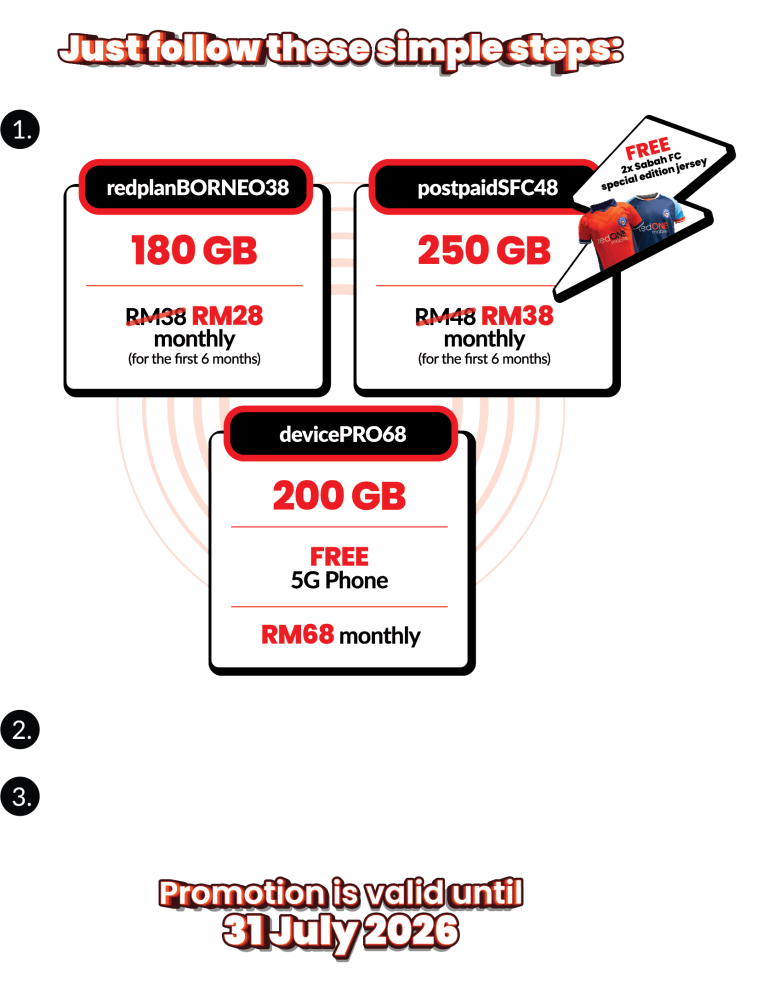
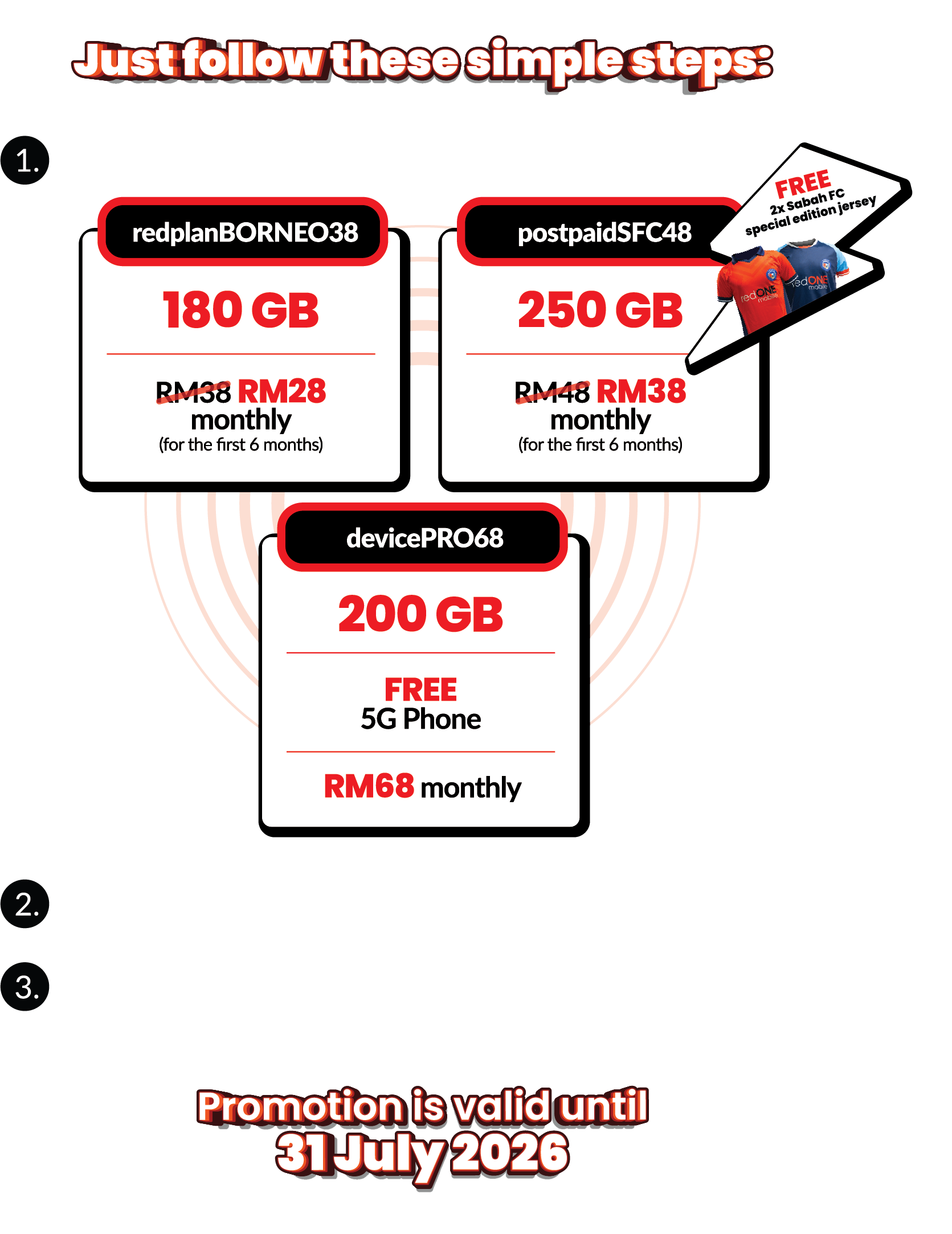
  • i. Sign up for any of the postpaid plans below during the campaign period:
    • redplanBORNEO38
    • postpaidSFC48
    • devicePRO68
  • ii. Follow official redONE Lido Square and redONE Mobile Facebook pages
  • iii. Ensure your line is active to be eligible for the lucky draw

4. When will the lucky draw results be announced?

The draw will be carried out in August 2026. Further details will be announced via redONE Mobile official channels.

5. Can I exchange the prizes for cash?

No. The prizes won, cannot be exchanged for cash, changed or redeemed in any shape or form by the winner.

6. Who can I contact for more information?

You may approach redONE Mobile Sales promoters at Lido Square, Kota Kinabalu during the campaign period for assistance.

1. The Tukar dan Menang promotion is a limited-time campaign running from 4 May 2026 to 31 July 2026, exclusively at Lido Square, Kota Kinabalu.

2. This Campaign is open to the general public. Participants must comply with all requirements stated herein to be eligible for participation and/or prizes.

3. To participate in the Campaign, eligible customers must complete the following steps during the Campaign Period:

  • i. Subscribe to any of the eligible postpaid plans:
    • redplanBORNEO38
    • postpaidSFC48
    • devicePRO68
  • ii. Follow the official redONE Lido Square and redONE Mobile Facebook pages.
  • iii. Ensure that the subscribed line remains active throughout the Campaign Period and until the lucky draw is conducted.

4. A lucky draw will be conducted in August 2026. Further details on announcement of winners will be communicated via official redONE Mobile channels.

5. For further information, participants may approach redONE Mobile Sales promoters at Lido Square during the campaign period.

6. All prizes are non-transferable, non-exchangeable, and are not redeemable for CASH or any other form of compensation, whether in part or in full.

7. redONE Mobile reserves the right to amend, modify, or cancel the campaign at any time without prior notice.

8. Participation in the Campaign constitutes acceptance of these Terms and Conditions.

9. Any decisions made by redONE Mobile in relation to the campaign, including selection of winners, shall be final and binding.

10. redONE Mobile reserves the right to amend, change, erase or add any of the terms and conditions at any time without giving prior notice.

11. redONE Mobile will not be liable to provide any replacement or compensation in the form of CASH or any kind for prizes that are lost, damaged, stolen.

EN  |  BM

Online Payment

Pay your redONE bill via your preferred online banking service or your credit card.
  1. Visit the SelfCare Sign In page and enter your redONE mobile number and password to login.

  2. In the SelfCare Homepage, select Download & Pay Bill.
  3. To pay your bill, select Pay Now.
  4. Enter the amount that you want to pay in the Amount column and click Proceed.
  5. Select your preferred payment choice of Credit Card or Online Banking
  6. Tick on the Terms & Conditions box and click Proceed.
  7. You will be directed to the payment page based on the payment choice you selected.
  8. Enter all the necessary details, tick on the required checkbox(es) and click Proceed.
  9. Print out the statement/receipt after the payment is completed.

NOTE: Please allow one (1) working day for any payment made via online banking to be reflected in redONE Selfcare system.

JomPay

Pay your bills with JomPAY in 3 simple steps.
  1. Look for the JomPAY logo and Biller Code on your redONE bill.
  2. Logon to your preferred Internet Banking or Mobile Banking portal and look for the JomPAY icon.
  3. Enter the redONE Biller Code 8607, Reference-1 redONE Customer ID and payment amount, and you’re done!

NOTE: Please allow one (1) working day for any payment made via JomPAY to be reflected in redONE Selfcare system.

Click here for more information on JomPAY.

Touch’nGo eWallet

Pay your bills with TNG eWallet.
  1. Download and open the TNG eWallet mobile app.
  2. Select Postpaid under the Services section.
  3. Select redONE.
  4. Key in your account number, phone number and amount.
  5. Enter your 6 digit TNG eWallet pin.

Online Boost

Pay your bills with Boost.
  1. Download and open the Boost App.
  2. Select Bill Payments.
  3. Add New Bill Account.
  4. Select redONE.
  5. Add redONE account number.
  6. Save your info and make payment.

GrabPay

Pay your bills with GrabPay.
  1. Download and open the Grab app.
  2. Select Bills.
  3. Select redONE Bill Payment.
  4. Key in your redONE number and amount.
  5. Select Enter.

redONE Partner Shop

Visit the nearest redONE Partner Shop to pay your bill in person
View the full listing of the redONE Partner Shops here to find an agent closest to you.

Celcom Payment Kiosks

You can now pay your bills at any Celcom Payment Kiosks.
As redONE’s services are powered by Celcom, our customers are also able to pay their redONE bills at all Celcom Payment Kiosks (CPKs). CPKs are strategically located in Celcom branches and Celcom Blue Cube outlets nationwide. View the full listing of CPK locations here.

7-Eleven

Visit the nearest 7-Eleven store to pay your redONE postpaid bill
For your convenience, you can now pay your redONE postpaid bill at any 7-Eleven outlet nationwide. Locate the nearest outlet here.

Mobile Money Merchants

Pay your redONE bill at over 1,500 shops nationwide that accept Mobile Money payments.
Through our partnership with Mobile Money, redONE users can now pay their bills at any Mobile Money retail merchants and terminals. Just look out for the Mobile Money symbol the next time you shop and ask to pay for “redONE” bill.

Maybank ATM, Cash Deposit Machine & Maybank2u

Pay your redONE bill with your Maybank banking account.

Visit any Maybank ATMs or Cash Deposit Machines nationwide, or login to your Maybank2u banking portal. Enter your redONE Customer ID which can be found on your monthly bill plus the payment amount, and you’re done!

NOTE: Please allow one (1) working day for any payment made via any Maybank channels e.g. ATM, Cash deposit and Maybank2u to be reflected in redONE Selfcare system.

Direct Debit

Charge your redONE bill directly to your credit card every month for your peace of mind.
For ultimate convenience and peace of mind, you can now set up monthly Direct Debit payments from your preferred credit card for your redONE bill. Our Customer Care representatives will be glad to help you set this up. Simply dial 1909 from your redONE number or 1300 11 0088 from other networks.

Senheng Stores

Visit the nearest Senheng stores to pay your bill in person
Through our partnership with Senheng, you are now able to pay your redONE bill at any Senheng outlets nationwide. Locate a Senheng store here.

senQ Stores

Visit the nearest senQ stores to pay your bill in person
Through our partnership with senQ, you are now able to pay your redONE bill at any senQ outlets nationwide. Locate a senQ store here.

e-Pay Retailers

Visit these retailers to top-up your prepaid in person.

  1. Petronas
  2. Shell
  3. Petron
  4. BHP
  5. Caltex
  6. Five Petroleum
  7. Buraqoil
  8. Pos Malaysia
  9. MyNews
  10. Econsave
  11. MYCU Retail
  12. Lotus
  13. All Happy Mart
  14. Mydin