* All prices stated exclude Service Tax. * Subscription is considered successful when the customer receives a confirmation SMS. * RM10 will be charged to the customer’s bill upon every successful subscription.
Amazing58
Amazing38
Add RM10/month
UNLIMITED voice calls
to all networks
Check Coverage
Powered by Celcom Axiata, our redONE users get to enjoy the same widest and best network coverage throughout Malaysia.
Locate An Agent
Visit one of our appointed agents or partners in your region.
FAQ
What is redCALL? redCALL is a Value-Added Service (VAS) that enables high voice usage customers to make unlimited voice calls to all networks in Malaysia.
Is redCALL a permanent VAS offered by redONE? Yes.
How can I subscribe to redCALL? For new customers, you can subscribe to redCALL when you sign up for a new redONE Postpaid line at any redONE Branch and Partner Shops near you. For existing customers, you can subscribe via:
redONE 1App MY
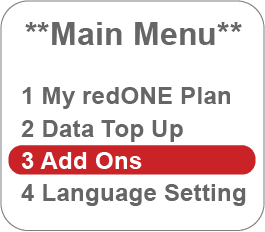
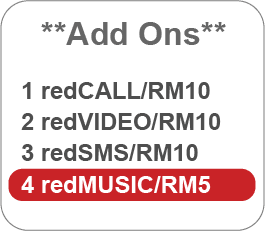
dialing *123#
Send < ON redCALL > to 23388
Contact our Customer Care
Who can subscribe to redCALL? redCALL is available exclusively to all new and existing RP8, Data28, Amazing8, Amazing28, Amazing38, Amazing48, Amazing58, Hybrid50 and Smart Bundle Plans.
How do I unsubscribe to redCALL? You can contact our Customer Care to unsubscribe.
Are there any charges for the SMS I sent to 23388? Yes. The standard RM0.15 per SMS will be charged to your bill.
I have terminated my subscription to redCALL. Can I subscribe to redCALL again? Yes, you can. RM10 (excluding Service Tax) per month will be charged to your bill for every successful subscription to redCALL.
Is there any registration fee required if I subscribe to redCALL? No, there is no registration fee required.
Will I be tied to a contract if I subscribe to redCALL? No, there is no contract for redCALL. You can choose to terminate redCALL anytime you want. However, the subscription fee will not be pro-rated and a full month subscription fee will be charged to your bill.
I am an Amazing48 plan customer. How do I subscribe to redCALL ? You can subscribe via:
redONE 1App MY
dialing *123#
Send < ON redCALL > to 23388
Contact our Customer Care
Terms & Conditions
The new redCALL Add-On Value-Added Service (VAS) offers unlimited voice calls to all networks and is applicable for domestic usage within Malaysia network only. Video calls and voice calls to special numbers are excluded.
Unlimited voice calls include calls to:
All domestic calls to redONE Postpaid, redONE Prepaid and other mobile operators
All domestic calls to national fixed line numbers
Calls excluded from the unlimited voice calls include:
Calls to 1300 / 1700 / 1600 / 1MOCC numbers
Calls to special and premium numbers
Video calls
IDD calls
Customers can subscribe and terminate redCALL any time.
In the event the customer terminates redCALL, the customer will be charged a full one (1) month subscription fee for the particular month even though the customer terminates redCALL at the beginning or middle of the month. Customers are advised to terminate redCALL before the start of the next bill cycle.
If the customer adds the redCALL subscription in the middle of the month, any previous usage will be charged normal rate and is not calculated under the unlimited calls. Only the usage after the successful subscription will be calculated under the unlimited calls quota.
In any event where the customer changes their subscribed postpaid plan to RP8, Amazing8, Amazing28 or Data28, the subscription to redCALL will be automatically terminated. The customer will be charged one (1) full month subscription fee in the bill.
The unlimited calls to all networks shall NOT be:
Resold, rented or utilised in any other way except as an individual making calls to other network users in Malaysia
Used for rerouting calls (connection with a device/software/application)
Used to set up switch devices which could keep a line open potentially for hours
Used for multiple simultaneous calling and conference calling
Used for call centre and telemarketing
Used for continuous calling for extended period of time, auto-dialing and machine-to-machine communication
The subscription fee for redCALL is not pro-rated and will be auto renewed on the 1st of every month unless redCALL has been terminated.
Unlimited voice calls to all networks is subject to our Fair Use Policy, which may be implemented if you exceed 100 hours a month. The complete Fair Use Policy can be found here.
Upon 100% utilisation of the maximum 100 hours, subsequent usage will be charged Pay-Per-Use (PPU) rate at RM0.15 per minute.
Key in your account number, phone number and amount.
Enter your 6 digit TNG eWallet pin.
Online Boost
Pay your bills with Boost.
Download and open the Boost App.
Select Bill Payments.
Add New Bill Account.
Select redONE.
Add redONE account number.
Save your info and make payment.
GrabPay
Pay your bills with GrabPay.
Download and open the Grab app.
Select Bills.
Select redONE Bill Payment.
Key in your redONE number and amount.
Select Enter.
redONE Partner Shop
Visit the nearest redONE Partner Shop to pay your bill in person
View the full listing of the redONE Partner Shops here to find an agent closest to you.
Celcom Payment Kiosks
You can now pay your bills at any Celcom Payment Kiosks.
As redONE’s services are powered by Celcom, our customers are also able to pay their redONE bills at all Celcom Payment Kiosks (CPKs). CPKs are strategically located in Celcom branches and Celcom Blue Cube outlets nationwide. View the full listing of CPK locations here.
7-Eleven
Visit the nearest 7-Eleven store to pay your redONE postpaid bill
For your convenience, you can now pay your redONE postpaid bill at any 7-Eleven outlet nationwide. Locate the nearest outlet here.
Mobile Money Merchants
Pay your redONE bill at over 1,500 shops nationwide that accept Mobile Money payments.
Through our partnership with Mobile Money, redONE users can now pay their bills at any Mobile Money retail merchants and terminals. Just look out for the Mobile Money symbol the next time you shop and ask to pay for “redONE” bill.
Maybank ATM, Cash Deposit Machine & Maybank2u
Pay your redONE bill with your Maybank banking account.
Visit any Maybank ATMs or Cash Deposit Machines nationwide, or login to your Maybank2u banking portal. Enter your redONE Customer ID which can be found on your monthly bill plus the payment amount, and you’re done!
NOTE: Please allow one (1) working day for any payment made via any Maybank channels e.g. ATM, Cash deposit and Maybank2u to be reflected in redONE Selfcare system.
Direct Debit
Charge your redONE bill directly to your credit card every month for your peace of mind.
For ultimate convenience and peace of mind, you can now set up monthly Direct Debit payments from your preferred credit card for your redONE bill. Our Customer Care representatives will be glad to help you set this up. Simply dial 1909 from your redONE number or 1300 11 0088 from other networks.
Senheng Stores
Visit the nearest Senheng stores to pay your bill in person
Through our partnership with Senheng, you are now able to pay your redONE bill at any Senheng outlets nationwide. Locate a Senheng store here.
senQ Stores
Visit the nearest senQ stores to pay your bill in person
Through our partnership with senQ, you are now able to pay your redONE bill at any senQ outlets nationwide. Locate a senQ store here.
e-Pay Retailers
Visit these retailers to top-up your prepaid in person.